How the Auditioning Planner Can Streamline Your Creative Career
For actors and performers, the audition process is a critical component of career development. Yet, managing the details—from appointment times to script notes to post-audition feedback—can be chaotic. This is where specialized tools like the Auditioning Planner come into focus. It is a structured, fully editable Canva template designed specifically as an interior for self-publishing via platforms like KDP (Kindle Direct Publishing). Understanding what this planner offers, and how it compares to other organizational methods, is key for performers seeking to optimize their workflow.
What Is the Auditioning Planner?
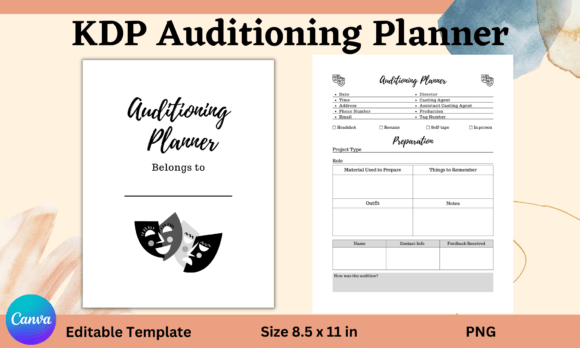
The Auditioning Planner is a digital template consisting of two unique pages built within the Canva ecosystem. Its primary purpose is to provide a consistent, professional format for logging every detail of an audition. The template utilizes only free Canva elements, ensuring accessibility and ease of customization. It is not a physical product or a standalone app; it is a design blueprint meant to be edited, printed, or used digitally by the performer.
The planner's structure is methodical. Key sections include Date, Time, Address, and contact fields for Phone Number and Email. It then delves into professional context with spaces for Director, Casting Agent, Assistant Casting Agent, and Production details. A Tag Number field helps track specific casting call identifiers. The core of the template is the Preparation section, which is broken down into subcategories: Role, Material Used to Prepare, Things to Remember, Outfit, and general Notes. Finally, it allows for reflection with fields for the performer's Name and Contact Info, Feedback Received, and a qualitative assessment under How was the audition.
Distinctive Features and Practical Application
What makes the Auditioning Planner distinct is its targeted design. Unlike generic notebooks or calendar apps, every field serves a direct purpose in the audition lifecycle. The Preparation breakdown, for instance, encourages a disciplined approach. Listing the Material Used to Prepare forces a performer to document their study process, which can be reviewed for future improvements. The Things to Remember section is crucial for last-minute mental notes before entering the room.
In practical use, filling out this template before an audition acts as a focused warm-up, consolidating scattered thoughts into a single, actionable document. After the audition, completing the Feedback Received and How was the audition sections creates a valuable record for long-term growth. This consistent logging builds a portfolio of audition experiences, allowing performers to analyze patterns in their performance, reception, and preparation effectiveness.
The Trade-offs of a Template-Based System
The Auditioning Planner's format presents certain trade-offs. Its strength is structure and specificity, but this can also be a limitation for those who prefer extreme flexibility. As a Canva template, it requires a basic understanding of that platform to edit layouts or colors. While it uses free elements, customization is bound by Canva's functionality. Compared to a blank notebook, it offers immense guidance; compared to a highly configurable digital database like a spreadsheet or a dedicated actor's app, it might feel less dynamically adaptable.
The fact that it is designed as a KDP interior also shapes its use case. It is ideal for performers who wish to create a physical, bound audition logbook for personal use or even for sale. However, for someone who needs real-time, cloud-synced access across devices, a digital note-taking app might be a more fitting alternative. The planner excels as a tangible, pre-formatted record, but it does not inherently offer reminders, calendar integration, or collaborative features.
Comparing Organizational Approaches for Performers
When evaluating tools for audition management, performers typically consider several categories: physical notebooks, digital note apps, specialized software, and template-based systems like the Auditioning Planner.
- Physical Notebooks: These offer ultimate simplicity and portability. However, they lack structure, leading to inconsistent records. Finding old audition details can be time-consuming. The Auditioning Planner template, when printed, brings that missing structure to a physical format.
- Digital Note Apps (Evernote, OneNote): These provide powerful search, tagging, and multi-device access. They can be configured to mimic the Auditioning Planner's sections. The trade-off is the initial time investment to create that structure from scratch. The Auditioning Planner provides instant, optimized layout.
- Specialized Actor Software: Some desktop or mobile apps are built specifically for actor portfolios and audition tracking. These often include additional features like headshot management, resume builders, and industry directories. They are usually more comprehensive but also more expensive. The Auditioning Planner is a low-cost, focused solution that handles only the logging function exceptionally well.
- Calendar Apps: Using calendar entries for auditions manages time and location well, but they fail to capture preparation details, feedback, and reflective notes. The Auditioning Planner complements a calendar by being the detailed content repository for each calendar entry.
When the Auditioning Planner Is the Right Fit
The Auditioning Planner template is likely the best choice for specific performer profiles. It fits well for actors who appreciate a consistent, paper-based system—perhaps those who find writing things down manually aids memory and reduces pre-audition digital distractions. It is also excellent for performers who are visually oriented and enjoy the process of customizing a clean template in Canva to match their personal brand.
Furthermore, it serves those who are building a long-term archive of their career journey. Having every audition documented in the same format makes comparative analysis straightforward. For teaching artists or coaches, this template could be a valuable resource to provide students, helping them standardize their professional approach early.
Scenarios Where Another Option Might Be Needed
Despite its utility, the Auditioning Planner may not suit every situation. Performers with a very high volume of auditions, such as those in major markets, might find filling out a detailed template for each call overly time-consuming. They might benefit more from a streamlined digital system with quick-entry templates.
If collaboration is essential—for instance, sharing audition details with an agent or manager—a cloud-based shared document or app would be more functional. Likewise, performers who need their audition log to be integrated with their scheduling and reminder systems will find a disjointed experience using a separate planner template. The decision factor here revolves around integration needs and workflow speed.
Evaluating the Core Benefit: Structured Reflection
A less obvious but significant benefit of the Auditioning Planner is its enforced structure for post-audition reflection. The Feedback Received and How was the audition fields are not common in generic tools. This prompts a performer to not just log the event, but to analyze it. Over time, this curated log becomes more than a schedule; it transforms into a personalized training manual. Patterns emerge: perhaps auditions where specific preparation material was used lead to better feedback, or certain outfits correlate with a more confident performance.
This analytical potential is a strong advantage over ad-hoc methods. In comparison, even a well-set-up digital note system might not prompt for this specific qualitative data unless the user consciously builds it in. The Auditioning Planner, by its design, makes this reflective practice a default part of the process.
Making an Informed Decision for Your Process
Choosing an audition management tool is about aligning with your personal workflow and career stage. Consider these factors:
- Volume and Pace: Can you dedicate time post-audition to fill out a detailed form? If your pace is frantic, a simpler solution may be better.
- Access Preference: Do you need access on your phone at the casting office, or is a physical notebook acceptable?
- Customization Need: Is the provided structure sufficient, or do you require fields unique to your niche (e.g., dance auditions with specific music fields)?
- Integration: How important is it for your audition log to connect with your calendar, task list, or communication tools?
The Auditioning Planner stands out as a focused, aesthetically controllable, and reflection-oriented tool. It is particularly compelling for performers who value a tangible record and a structured preparatory ritual. For those whose needs lean towards high-speed digital integration or highly customizable data fields, exploring alternatives within digital note-taking or specialized software may yield a better fit. Ultimately, the goal is to reduce administrative chaos so you can focus on the performance itself. Whether through the Auditioning Planner or another method, a systematic approach to audition logistics is a professional advantage in any creative career.