A Practical Guide to the KDP 6x9 in 50 Pages Cover Template
Designing a book cover that meets Amazon’s exact technical specifications can be one of the most frustrating hurdles for self-publishing authors. You've poured your energy into writing and editing, only to be stopped by the seemingly simple task of making a cover file that fits. If you’ve struggled with dimensions, bleed areas, or spine width calculations, a dedicated template can be the solution that gets your project moving again. The KDP Cover Template 6x9 in 50 Pages is precisely that kind of practical tool.
What This Cover Template Provides
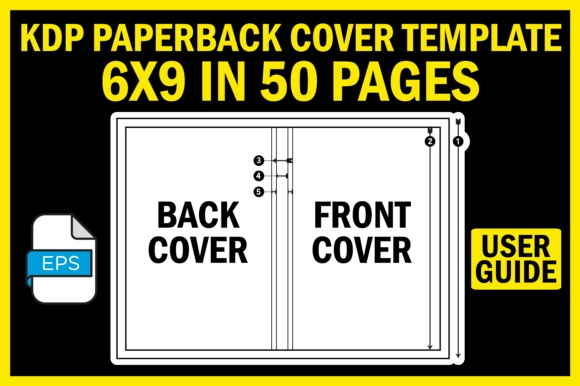
At its core, this resource is a pre-built digital framework. It is a structured file designed for books with a trim size of 6 inches by 9 inches and a book block of 50 pages. This specific page count is critical because it directly determines the spine width—a dimension that must be precise for your printed book to look professional. The template gives you a canvas with all the zones—front cover, spine, and back cover—already correctly sized and positioned. This removes the guesswork and manual measurement, allowing you to focus purely on the creative design of your cover.
The download includes several key components. The primary file is an EPS format template in high-resolution 300dpi, suitable for professional design software like Adobe Illustrator or Photoshop. A supplementary CoverSizeGuide.jpg image offers a visual breakdown, explaining each part of the cover layout. Finally, a ReadMe.txt file acts as a straightforward user guide. This package is built for utility, not complexity.
Key Strengths and Notable Qualities
The most significant strength of the KDP Cover Template 6x9 in 50 Pages is its precision. Amazon KDP requires files that adhere to strict millimeter-accurate guidelines. Using an off-sized cover can lead to printing errors, misaligned text, or customer returns. This template encodes that exactness, so your final file submission is compliant from the start.
Another notable quality is its format. The EPS file is vector-based, meaning it can be scaled without losing quality. This is ideal for high-resolution print requirements. The inclusion of the visual guide and instructions also makes it accessible. You don’t need to be a graphic design expert to understand where to place your title, author name, or back cover blurb. It demystifies the technical layout, which is a common barrier for first-time publishers and busy professionals.
Practical Applications Across Different Fields
The usefulness of this template extends far beyond just novelists. In professional and educational environments, individuals publishing manuals, workbooks, research compendiums, or course materials often choose the popular 6x9 format for its balance of portability and readability. A freelancer creating a portfolio book of their work, or a marketer publishing a case study collection, can use this template to ensure a polished, credible presentation without hiring a designer.
Educators and bloggers transforming their content into physical books benefit greatly. The template handles the technical overhead, allowing them to invest time in content quality and cover aesthetics. For hobbyists writing family histories, recipe books, or club guides, the template provides a reliable structure that makes the publishing process less intimidating. In any commercial or personal publishing effort, a correctly sized cover is fundamental to perceived quality.
Real-World Benefits for Your Publishing Process
Implementing a precise template like this translates into tangible benefits. The foremost is time efficiency. Hours spent researching KDP help pages, testing dimensions, and correcting files can be reduced to minutes. You open the template, import your artwork, and arrange your text within the defined safe zones.
This efficiency directly impacts user experience and productivity. The frustration of technical rejection from KDP’s review system is minimized. You gain confidence that your file will pass, smoothing your path from manuscript to marketplace. Furthermore, a professionally proportioned cover enhances your book’s branding and communication. It signals to readers that the work inside is carefully produced, which can influence purchasing decisions and reviews.
Realistic Use Cases and Observations
Consider an entrepreneur publishing a short business methodology guide. The book is exactly 50 pages. Using a generic template or guessing the spine width could result in a spine so thin the title gets cut off, or so wide it looks awkward. The KDP Cover Template 6x9 in 50 Pages provides the exact frame. The entrepreneur can drop their background image into the front cover area, place the logo and text on the spine with confidence, and add their bio and barcode on the back cover—all within a guaranteed-acceptable layout.
Another observation: many authors use design tools with limited KDP-specific features. Canva, for instance, is popular but may not have precise templates for every page count variant. This external EPS template can serve as a reliable master layout that you can design around, even if your primary tool is simpler.
Practical Considerations When Using the Template
While the template solves the size problem, remember it is a framework, not a design. You still need to supply your own visual creativity—images, colors, typography, and graphic elements. Ensure your design software supports EPS files. If you use Photoshop, you’ll work with a rasterized version; in Illustrator, you’ll retain full vector flexibility.
Always cross-reference with the CoverSizeGuide.jpg. Understand what the “bleed” area is—the extra margin that gets trimmed off—and keep critical text and logos within the “safe zone.” The ReadMe file is your first point of reference for any specific instructions about layers or guidelines in the template itself.
Finally, verify your book’s final page count. If your manuscript is 48 or 52 pages after final formatting, the spine width will change. The KDP Cover Template 6x9 in 50 Pages is calculated for exactly 50 pages. For a different count, you would need a correspondingly different template. Accuracy in your page count is therefore essential before you begin the cover design process with this specific tool.
In essence, this template is a bridge. It connects your creative vision with the stringent technical requirements of modern print-on-demand publishing. For anyone who finds cover dimensions a difficult final step, the KDP Cover Template 6x9 in 50 Pages provides a clear, reliable, and useful path to a professionally presented book.